Up-Down Move Balance
Totals the per-bar change of the selected price separately for rises and falls. Expresses the difference in the size of changes, not the number of bars, from −100 to +100.
Coming soon · MT5 only · no licence file needed
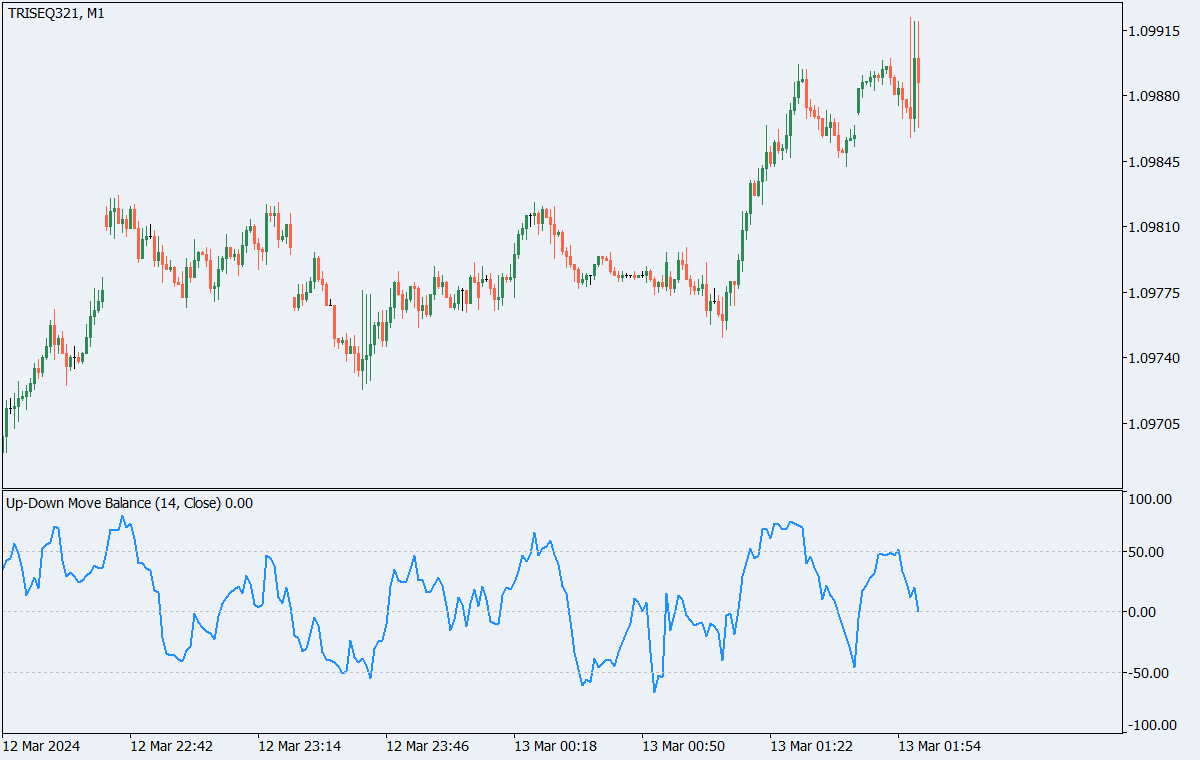
Examples with changed settings are in the manual.
Main settings
| Input | Default |
|---|---|
| Period | 14 |
| Applied Price | Close |
Usage specifications
Initial display
Starts from bar Period+1. The default is bar 15. With a history of Period bars or fewer, the line is not drawn.
Forming bar
The latest value changes with the price. If Applied Price is Open, the bar's open is fixed, so the value does not change during the bar.
Vertical axis and display digits
Fixed at −100 to +100 and shown with 2 decimal places. The last digit of the internal calculation can deviate not only inside ±100 but also outside it.
History and calculation
On each bar it recalculates the most recent Period changes. If the required window is the same, it does not depend on where older history starts.
Rounding of the calculated price
With Median, Typical and Weighted, the last digit of the calculated price may differ even when it looks the same on screen, so the value may not be 0 and may reach ±100. With Close, Open, High and Low, a window where the input price does not change gives 0.
Only 1 instance of the same product on 1 chart
This manual describes adding 1 instance of this product to 1 chart. To compare different settings, use separate charts.
For on-screen display only
Displays, marks and notifications are records of calculation results. They do not direct trading decisions and do not guarantee future price movements.
Full manual
How to read the display, the settings, installation and what to check when something goes wrong, on one page. The product is in preparation for release; the manual is published so that you can review its content.
- MT5 display and examples of changed settings
- How to read it in 30 seconds
- What it measures
- Situations for reading the display
- Steps for checking the display
- Installation and checking the package contents
- Settings
- Usage specifications
- Troubleshooting and usage notes
- Technical information and specification details