Confirmed Swing Lines and Targets
Draws lines from pairs of confirmed highs and lows and shows where the close first crossed a line and calculated target levels.
Coming soon · MT5 only · no licence file needed
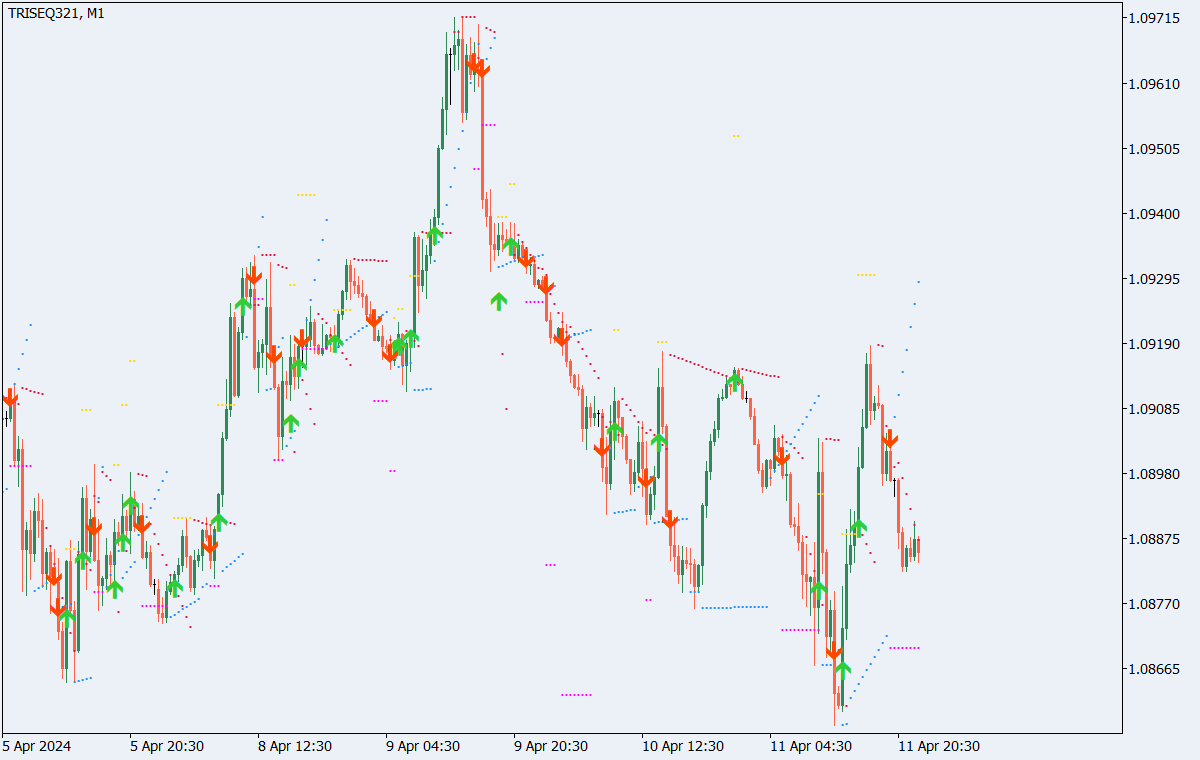
Examples with changed settings are in the manual.
Main settings
| Input | Default |
|---|---|
| Swing Point Rule | Classic (1 bar each side, above the close 2 bars before) |
| Bars On Each Side (Level and Strict rules, 1 to 20) | 2 |
| Show Targets | true |
| Closed Bars Only | true |
| Show Trilogy brand and QR code | true |
| Brand position (chart corner) | Lower left |
| Brand horizontal offset (pixels) | 10 |
| Brand vertical offset (pixels) | 10 |
Usage specifications
Line confirmation and break confirmation
The pair of dots for a line is decided with confirmed data up to before that bar opens. The default break evaluation is made after that bar closes. Read these two time points separately.
Crossing from the previous bar is not required
On the bar where a new line starts to be used, if the close is already outside the line, the first mark appears. It does not require the previous bar to have been inside the line.
Changes to history and settings
Recalculating after adding to or correcting the history, changing the start position or changing settings may change past display. Distinguish this from adding subsequent bars to the same history.
Scope of functions
There are no notifications, emails, automated trading or position management. There are also no arrows pointing at the swing points themselves as peaks or troughs. It is for displaying each line and the breaks and targets.
For on-screen display only
The display is a record of calculation results. It does not direct trading decisions and does not guarantee future price movements.
Full manual
How to read the display, the settings, installation and what to check when something goes wrong, on one page. The product is in preparation for release; the manual is published so that you can review its content.
- MT5 display and examples of changed settings
- How to read it in 30 seconds
- What it measures
- Situations for reading the display
- Steps for checking the display
- Installation and checking the package contents
- Settings
- Usage specifications
- Troubleshooting and usage notes
- Technical information and specification details