Swing Level Share
Draws as separate lines the share of the last six swing lows and six swing highs that are below the close. Both lines take seven values from 0 to 100.
Coming soon · MT5 only · no licence file needed
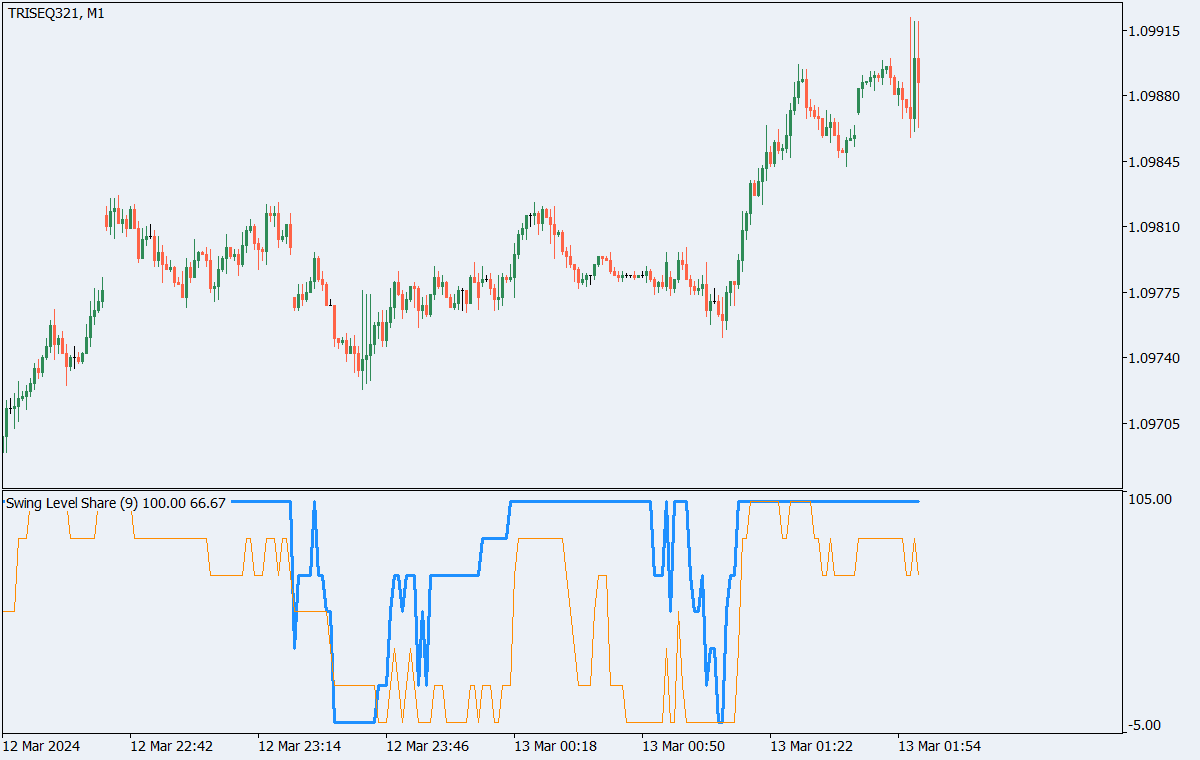
Examples with changed settings are in the manual.
Main settings
| Input | Default |
|---|---|
| Swing Window | 9 |
Usage specifications
Even-numbered windows
The center is the position (Swing Window−1)÷2 bars back from the latest bar, rounded down. For 8 bars, there are 3 on the newer side and 4 on the older side, so the older side has 1 more bar.
Start of drawing
Each line is not drawn until 6 values have accumulated. At the earliest it starts from bar Swing Window+5, and in practice later depending on the price data. With large periods, one of the lines may not accumulate enough values.
Updates on the forming bar
When the close moves, the comparison results change. Also, updates to the high or low of the latest bar may drop the center bar as a candidate during the bar. The value for that bar is fixed when the bar closes.
Display range
Values are 0 to 100, but the vertical axis is −5 to 105 including margins. There are no level lines. Do not read the −5/105 margin as the range of calculated values.
Line overlap and header
At equal values the thin orange line overlaps on top of the thick blue line. The header at the top left may also hide lines near 100. The window name shows the period, and the following 2 values are shown in the order blue, orange, with 2 decimal places.
Notifications
This product has no notification or mark functions.
Only 1 instance of the same product on 1 chart
This manual describes adding 1 instance of this product to 1 chart. To compare different settings, use separate charts.
For on-screen display only
Displays, marks and notifications are records of calculation results. They do not direct trading decisions and do not guarantee future price movements.
Full manual
How to read the display, the settings, installation and what to check when something goes wrong, on one page. The product is in preparation for release; the manual is published so that you can review its content.
- MT5 display and examples of changed settings
- How to read it in 30 seconds
- What it measures
- Situations for reading the display
- Steps for checking the display
- Installation and checking the package contents
- Settings
- Usage specifications
- Troubleshooting and usage notes
- Technical information and specification details