Step Band Position
Builds three kinds of stepped references from the range of price movement and shows their relative position as two lines or difference bars. Cross marks and notifications on confirmed bars are optional.
Coming soon · MT5 only · no licence file needed
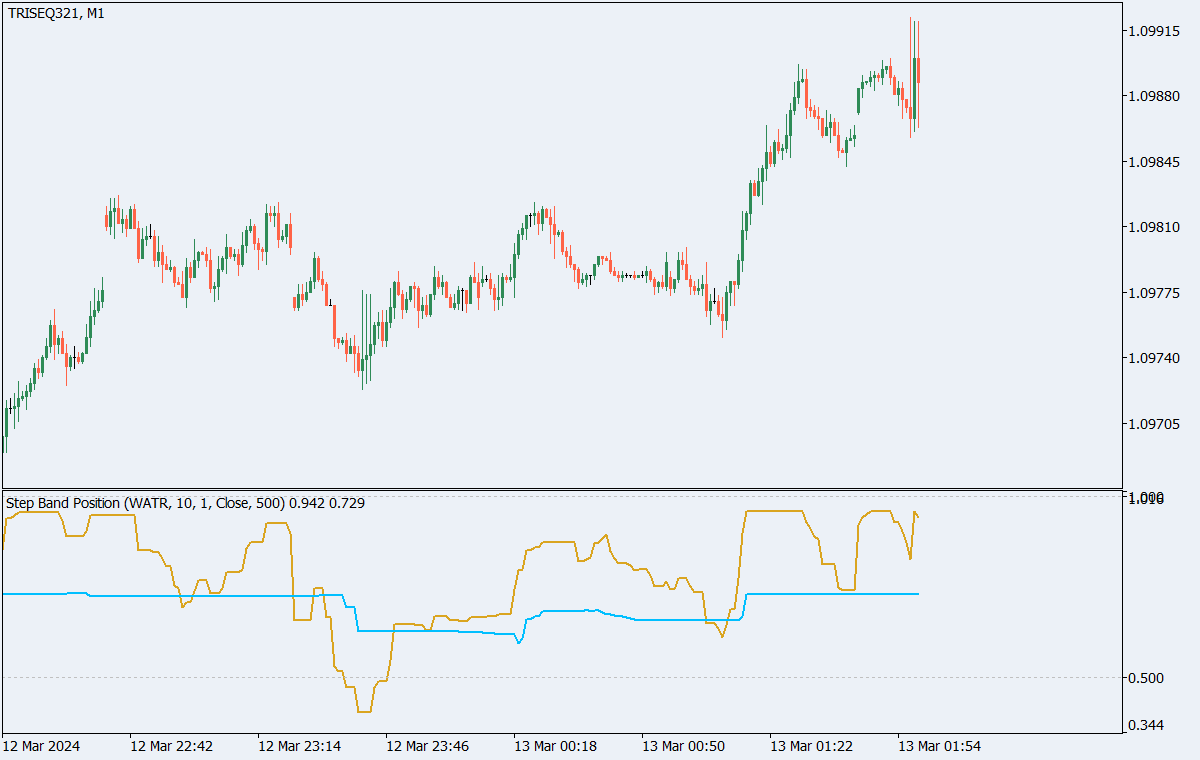
Examples with changed settings are in the manual.
Main settings
| Input | Default |
|---|---|
| Step Source | Weighted range (sum / period) |
| Source Period | 10 |
| Step Multiplier | 1 |
| Band Basis | Close |
| Range Lookback | 500 |
| Display | Two lines |
| Show Cross Marks | false |
| Alert on Closed-Bar Cross | false |
Usage specifications
Difference between WATR and ATR
WATR's weights are divided by Period, not by their sum. This differs from a normal weighted average. ATR, on the other hand, also includes gaps from the previous close, so which of the two is larger depends on the price path.
Top scale label in the images
In the 2 images shown, the top of the automatic scale is close to 1, and the top value and the 1.0 value overlap. Use them as examples for viewing the shape of the lines and the marks. Check the exact scale on the chart you are using.
Do not treat marks as forecasts
Both marks and notifications are records of crossing conditions that have already been met. Values of the forming bar change, and there is no guarantee that they stay unchanged when recalculated after past history changes.
Notification timing
On a price update of a new bar, it evaluates the latest closed bar. Right after attaching or changing settings, it only records the time and does not send notifications for past conditions in bulk. Even if several bars advance, it does not replay notifications for every bar. The time in the message is the start time of the target bar.
Notifications and terminal settings
Notifications are English pop-ups. There is no email, push or custom sound file playback, but a sound may play depending on the notification settings in MT5. The notification time cannot be guaranteed while no price updates arrive.
The forming bar changes
On the latest bar, values and colors change with price updates. If the timeframe, the start of the history or past prices change, the recalculated values may also change.
Do not judge by the 0 in the header alone
Even for a line that is not drawn because the required history is insufficient, the separate window header may show 0 at the display precision (0.00 for RSI and MACD, 0.0000 for the transform bars, 0.000 for the step band). Check whether the line exists together with the number of bars required. Values of lines hidden by input are not shown in the header either.
Keep unused inputs within range too
Periods of unselected methods and similar inputs are also subject to the input range check. If out of range, it does not start, and a 1-line reason in English appears in the Experts tab.
Only 1 instance of the same product on 1 chart
This manual describes adding 1 instance of this product to 1 chart. To compare different settings, use separate charts.
For on-screen display only
Displays, marks and notifications are records of calculation results. They do not direct trading decisions and do not guarantee future price movements.
Full manual
How to read the display, the settings, installation and what to check when something goes wrong, on one page. The product is in preparation for release; the manual is published so that you can review its content.
- MT5 display and examples of changed settings
- How to read it in 30 seconds
- What it measures
- Situations for reading the display
- Steps for checking the display
- Installation and checking the package contents
- Settings
- Usage specifications
- Troubleshooting and usage notes
- Technical information and specification details