Range Scaled Price Candles
Candles that convert the open, high, low and close into distances from the average of recent median prices. One unit is 0.2 times the average range, not a price scale.
Coming soon · MT5 only · no licence file needed
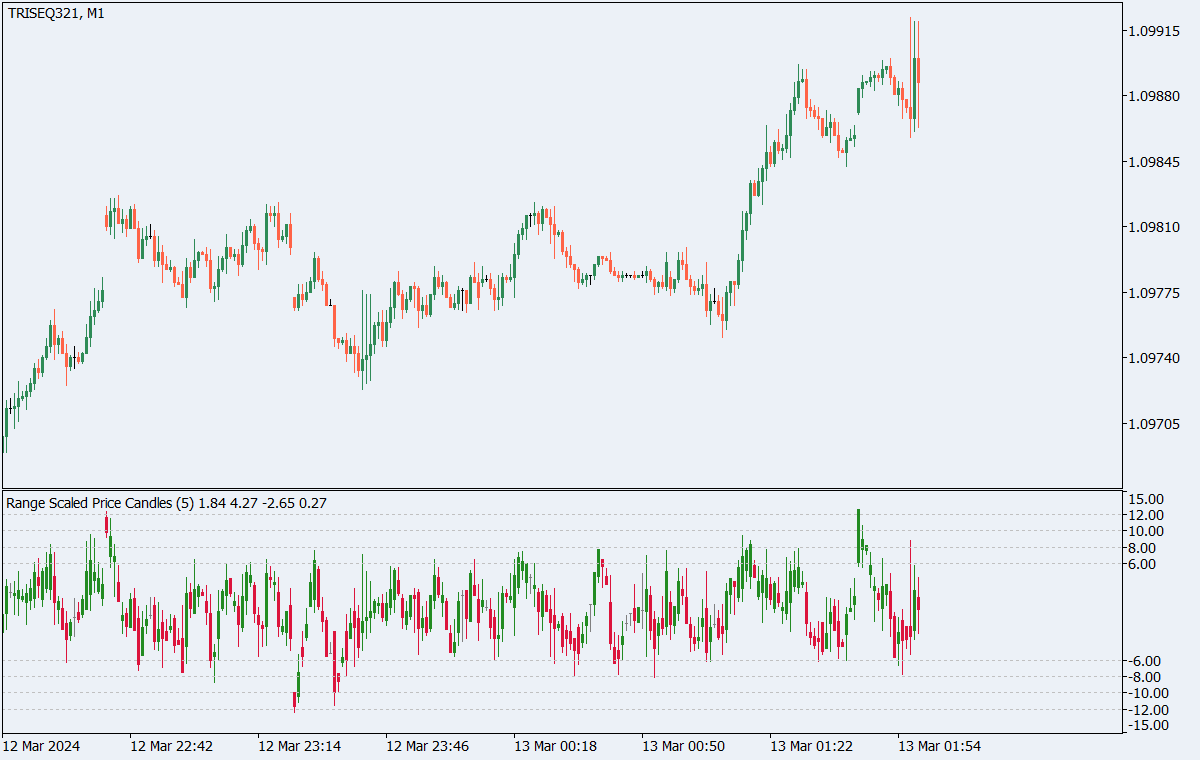
Examples with changed settings are in the manual.
Main settings
| Input | Default |
|---|---|
| Period | 5 |
Usage specifications
Fixed display range
The indicator sets the vertical axis to −15 to +15. Parts outside it are not visible. Lengthening the period may increase the number of bars that fall entirely outside.
Bars that are not drawn
It does not draw the first Period−1 bars, when the number of bars is less than Period, or in sections where high = low on all of the most recent Period bars. In the last case, this is because the conversion unit becomes 0.
The 4 values and color while forming
Updates to the high or low change the reference and the unit, so all 4 values, including the open, change. The color is determined by the close and open at that moment, so it may change during the bar.
Right after a section with a range of 0
Because the average range is small, the converted values swing widely. If all of the previous Period−1 bars had a range of 0 and only that bar has a range, the height is 5×Period. With Period 7 or more it does not fit within the window height.
Header
The window name is followed by the period, and the 4 values after that are open, high, low and close, in that order, with 2 decimal places. This product does not call notifications.
Only 1 instance of the same product on 1 chart
This manual describes adding 1 instance of this product to 1 chart. To compare different settings, use separate charts.
For on-screen display only
Displays, marks and notifications are records of calculation results. They do not direct trading decisions and do not guarantee future price movements.
Full manual
How to read the display, the settings, installation and what to check when something goes wrong, on one page. The product is in preparation for release; the manual is published so that you can review its content.
- MT5 display and examples of changed settings
- How to read it in 30 seconds
- What it measures
- Situations for reading the display
- Steps for checking the display
- Installation and checking the package contents
- Settings
- Usage specifications
- Troubleshooting and usage notes
- Technical information and specification details