Fractal Level Grid
Places two levels from peaks and troughs confirmed by the bars on each side and draws five lines dividing the space between them into six. When the high or low breaks a level, it searches again for an earlier level that meets the conditions.
Coming soon · MT5 only · no licence file needed
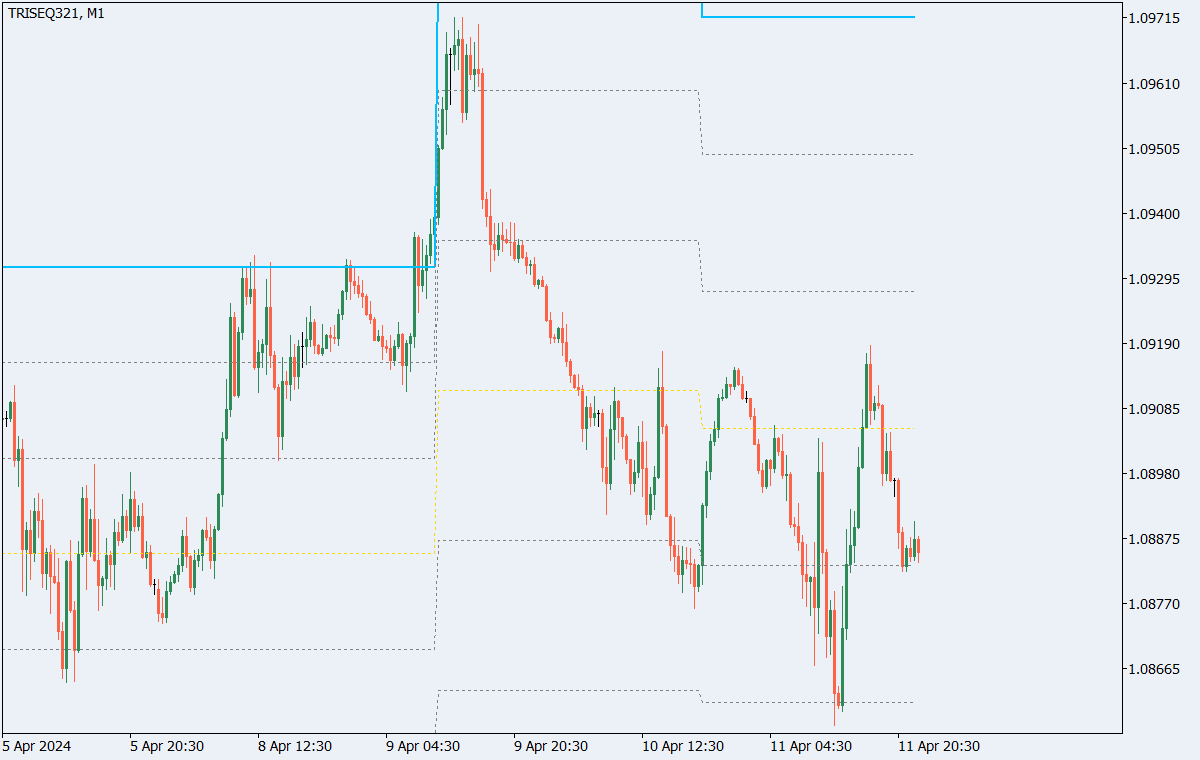
Examples with changed settings are in the manual.
Main settings
| Input | Default |
|---|---|
| Left Bars (bars not inside the previous bar, 1 to 500) | 50 |
| Right Bars (bars not inside the previous bar, 1 to 500) | 50 |
| Filter (percent of the band, 0 to 1000) | 10 |
| Closed Bars Only | true |
| Show Trilogy brand and QR code | true |
| Brand position (chart corner) | Lower left |
| Brand horizontal offset (pixels) | 10 |
| Brand vertical offset (pixels) | 10 |
Usage specifications
Confirmed values with the same history and settings
Levels on closed bars are not redrawn to the center of peaks or troughs found later. Recalculating from the beginning after adding to or correcting the history or changing settings may change results.
Latest bar and line connections
By default the latest bar is blank. Adjacent bars where the level switches are connected by a line, so a step change may look diagonal.
Start of display
The 7 lines are displayed once both upper and lower levels are available as positive prices. The implementation is not intended for uses that handle prices of zero or below.
Functions not included
There are no Fibonacci fan or retracement objects, arrows, notification sounds, automatic orders, specification of another timeframe or account authentication. There is also no input to change the grid ratios.
For on-screen display only
The display is a record of calculation results. It does not direct trading decisions and does not guarantee future price movements.
Full manual
How to read the display, the settings, installation and what to check when something goes wrong, on one page. The product is in preparation for release; the manual is published so that you can review its content.
- MT5 display and examples of changed settings
- How to read it in 30 seconds
- What it measures
- Situations for reading the display
- Steps for checking the display
- Installation and checking the package contents
- Settings
- Usage specifications
- Troubleshooting and usage notes
- Technical information and specification details