Five Vote Combo Histogram
Reads separately the bars totalling the direction of five kinds of calculation and a line of the state carried forward after the conditions are met.
Coming soon · MT5 only · no licence file needed
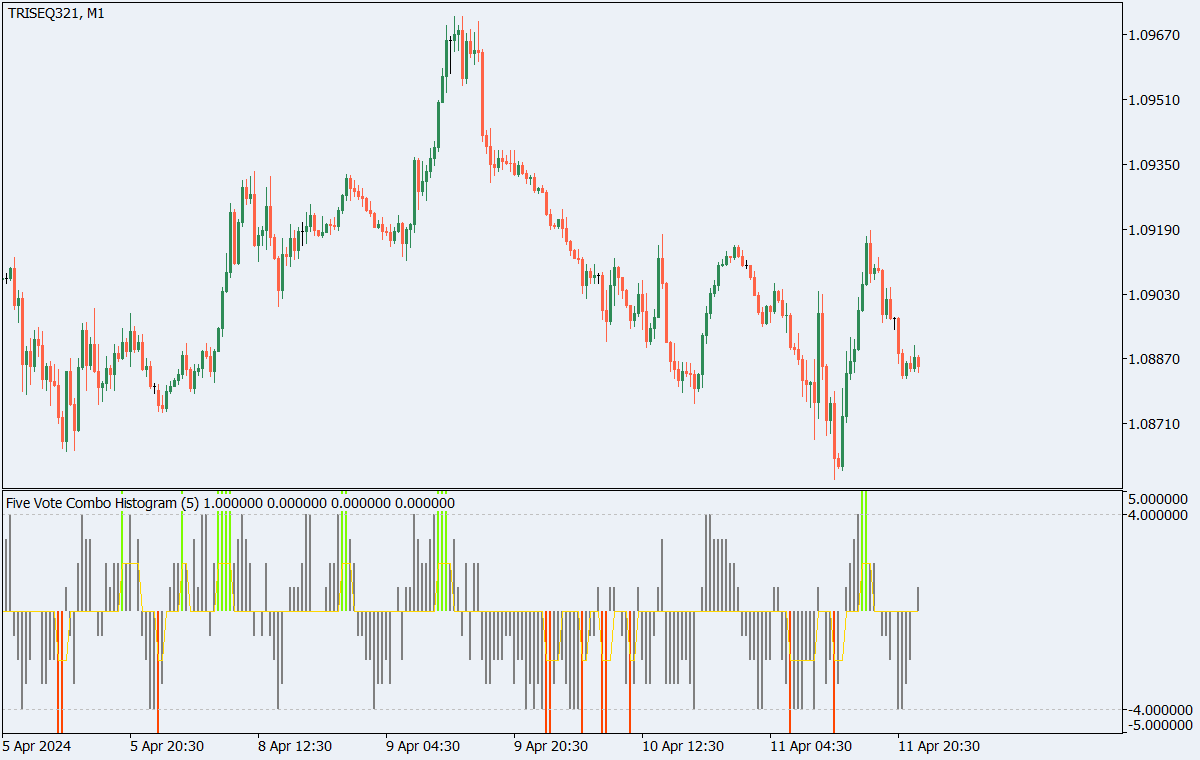
Examples with changed settings are in the manual.
Main settings
| Input | Default |
|---|---|
| Threshold (1 to 5) | 5 |
| Fast LWMA Period | 5 |
| Slow LWMA Period | 20 |
| CCI Period | 5 |
| RVI Period | 1 |
| ADX Period | 14 |
| ADX Level | 20 |
| Forecast Period | 15 |
| T3 Period | 3 |
| T3 Volume Factor | 0.7 |
| RVI Exit Gap | 0.2 |
| Show Trilogy brand and QR code | true |
| Brand position (chart corner) | Lower left |
| Brand horizontal offset (pixels) | 10 |
| Brand vertical offset (pixels) | 10 |
Usage specifications
For on-screen display only
Does not place, modify or close orders. There are no notifications or emails. The English label Trade State is a calculated state, not an actual position.
Current bar and history
Calculates every time from the oldest bar of the loaded history. The current bar changes, and if older history is added or corrected, this also affects the initial values and the chain of states.
Fixed scale and visibility
The vertical axis is −5 to +5. Bars at ±5 reach the edge because of the upper and lower limits of the calculated value. Gold may be hard to see on a light background; adjust the color settings in the properties or the background.
Brand display
Displays Produced by Trilogy Inc. and a QR code to https://www.trgy.co.jp/. There is no account authentication. The brand text is white or black depending on the background, but the bars and the gold state line are not subject to this automatic switching.
For on-screen display only
The display is a record of calculation results. It does not direct trading decisions and does not guarantee future price movements.
Full manual
How to read the display, the settings, installation and what to check when something goes wrong, on one page. The product is in preparation for release; the manual is published so that you can review its content.
- MT5 display and examples of changed settings
- How to read it in 30 seconds
- What it measures
- Situations for reading the display
- Steps for checking the display
- Installation and checking the package contents
- Settings
- Usage specifications
- Troubleshooting and usage notes
- Technical information and specification details