Cycle Swing Marks
Puts a mark on the bar where smoothed price has moved back a set amount from a held low or high. Small and large turns are recorded separately; it shows when a turn was confirmed, not the price top or bottom itself.
Coming soon · MT5 only · no licence file needed
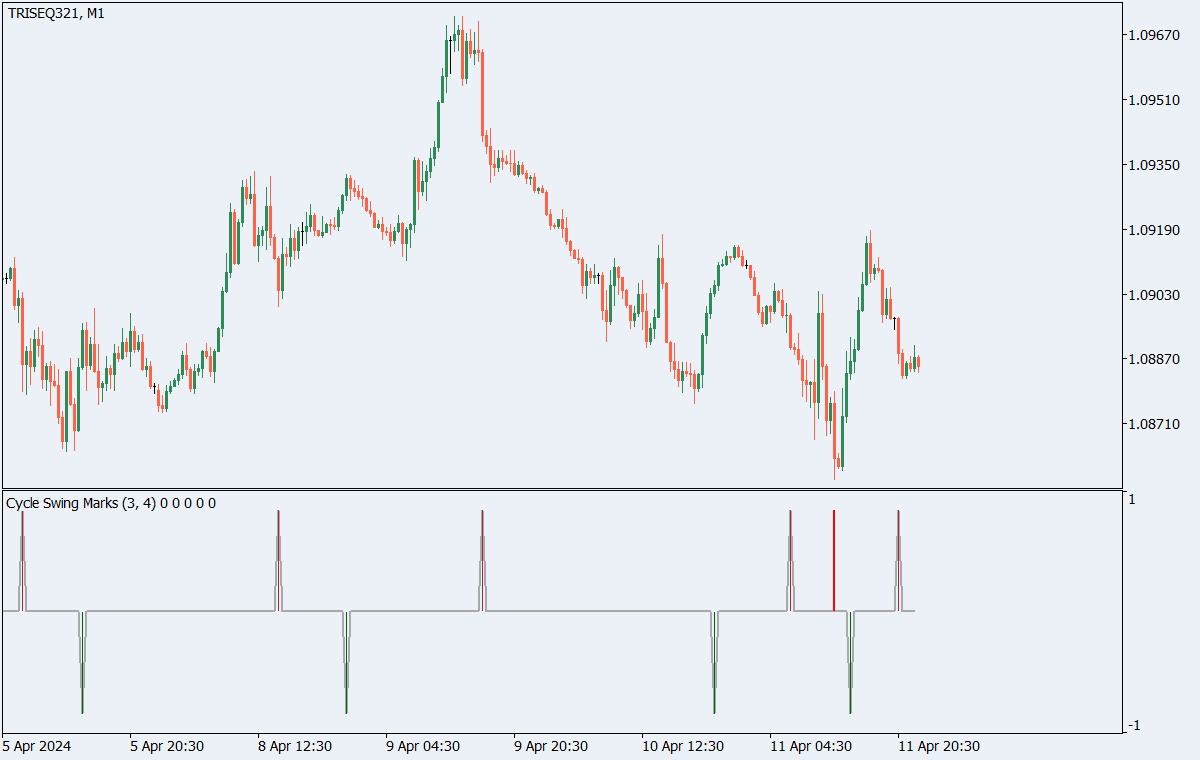
Examples with changed settings are in the manual.
Main settings
| Input | Default |
|---|---|
| Range Multiple (1 to 50) | 3 |
| Major Multiple (1 to 20) | 4 |
| Price Smoothing (1 to 200) | 1 |
| Smoothing Method | SMMA |
| Smoothing Price | Close |
| Closed Bars Only | true |
| Show Trilogy brand and QR code | true |
| Brand position (chart corner) | Lower left |
| Brand horizontal offset (pixels) | 10 |
| Brand vertical offset (pixels) | 10 |
Usage specifications
Display height
The vertical axis is fixed at −1.2 to 1.2, and marks are at ±1. They are not prices, profits or strength scores. Large and small marks have the same height; look at the color and thickness.
Display after confirmation
When closed bars are added with the same settings and history, confirmed marks are not moved to past extremes. The false setting, which includes the forming bar, is not covered by this condition.
Recalculation
Results are recalculated on settings changes, correction or additional loading of history, and changes of the start position. In these cases, the marks are not guaranteed to stay unchanged.
Functions not included
There is no UseCycleFilter, no filtering by ZeroLag or RSI, and no notifications or orders.
For on-screen display only
The display is a record of calculation results. It does not direct trading decisions and does not guarantee future price movements.
Full manual
How to read the display, the settings, installation and what to check when something goes wrong, on one page. The product is in preparation for release; the manual is published so that you can review its content.
- MT5 display and examples of changed settings
- How to read it in 30 seconds
- What it measures
- Situations for reading the display
- Steps for checking the display
- Installation and checking the package contents
- Settings
- Usage specifications
- Troubleshooting and usage notes
- Technical information and specification details