Confirmed ZigZag
Records peak and trough candidates only after the conditions are met, and shows the levels of the last confirmed high and low.
Coming soon · MT5 only · no licence file needed
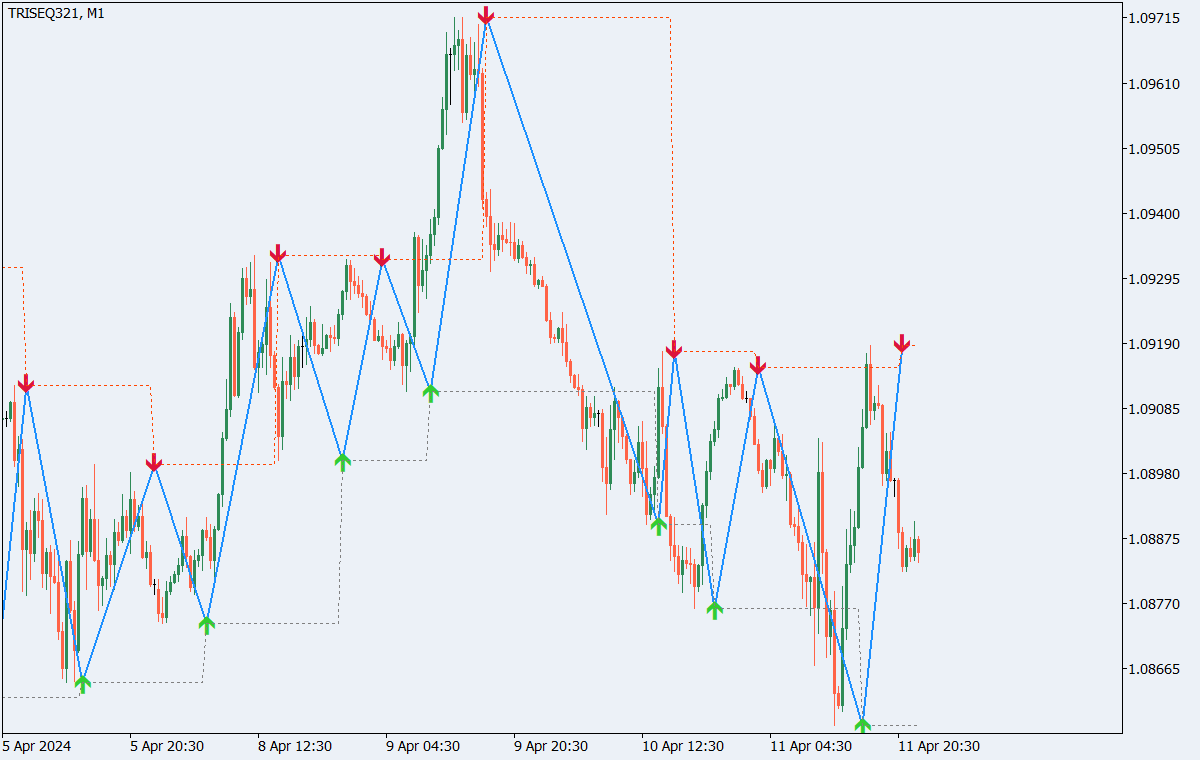
Examples with changed settings are in the manual.
Main settings
| Input | Default |
|---|---|
| Depth (bars, 2 to 1000) | 12 |
| Deviation (points, 0 to 100000) | 5 |
| Backstep (bars, 0 to 1000) | 3 |
| Price | High And Low |
| Closed Bars Only | true |
| Show Trilogy brand and QR code | true |
| Brand position (chart corner) | Lower left |
| Brand horizontal offset (pixels) | 10 |
| Brand vertical offset (pixels) | 10 |
Usage specifications
Scope that stays fixed
When normal updates continue with the same settings and the same price history, dots on confirming bars that have already closed are not moved to another bar afterward. If the conditions of history additions or corrections, settings changes or recalculation change, results may change.
The blue line is added later
Even if the confirmed dots themselves do not change, the line between the 2 dots is drawn only once the next dot is formed. The segment was not necessarily visible at the time of each intermediate bar.
Difference from the standard ZigZag
This is a proprietary method that uses Depth, Deviation and Backstep as confirmation conditions. Even with the same values entered, the number, prices and times of vertices do not necessarily match the standard ZigZag.
Unit of points
For example, if the smallest displayed unit is 0.00001, 5 points is 0.00005; if it is 0.0001, it is 0.0005. Check the number of digits of the symbol.
Site version without authentication
Does not require an account number or license file. It is a display-only indicator for MT5 and does not place or close orders.
For on-screen display only
The display is a record of calculation results. It does not direct trading decisions and does not guarantee future price movements.
Full manual
How to read the display, the settings, installation and what to check when something goes wrong, on one page. The product is in preparation for release; the manual is published so that you can review its content.
- MT5 display and examples of changed settings
- How to read it in 30 seconds
- What it measures
- Situations for reading the display
- Steps for checking the display
- Installation and checking the package contents
- Settings
- Usage specifications
- Troubleshooting and usage notes
- Technical information and specification details