CCI EMA Band Reversal Arrows
Combines CCI and its EMA with Bollinger Bands and the bar's high and low, and shows the bars where the conditions agree with blue or red arrows. No lines are drawn; by default only confirmed bars are marked.
Coming soon · MT5 only · no licence file needed
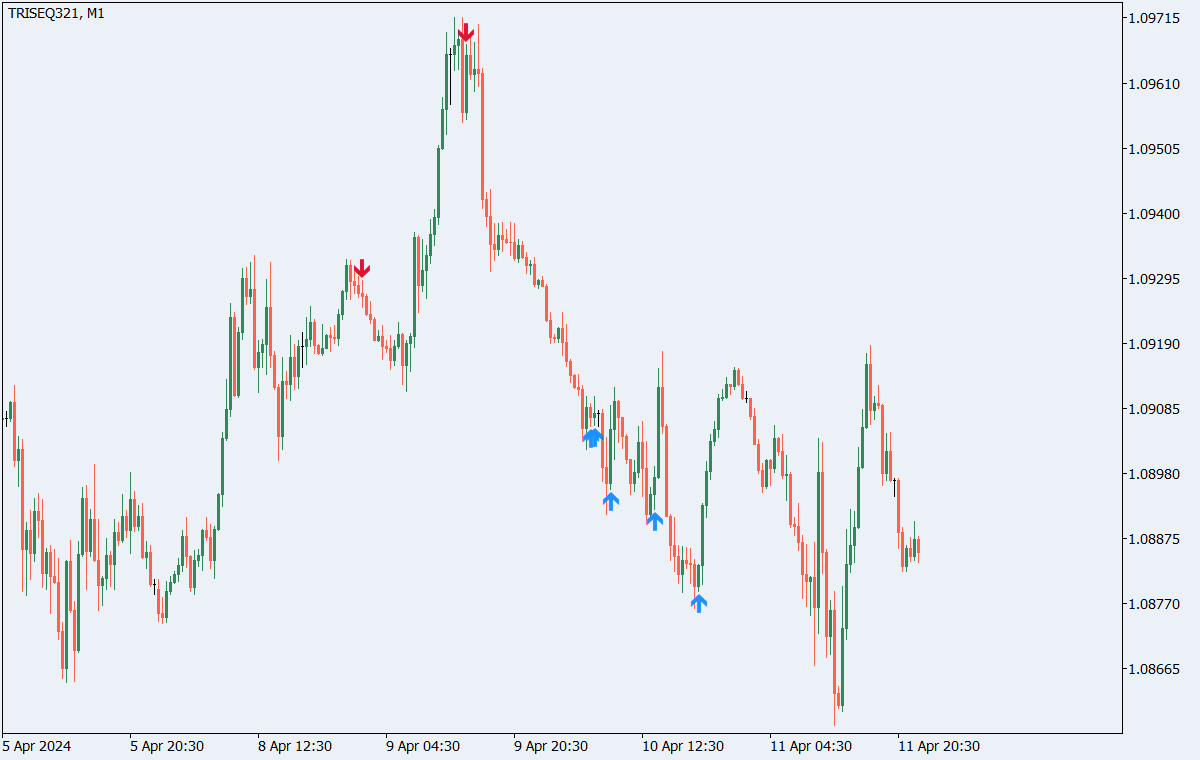
Examples with changed settings are in the manual.
Main settings
| Input | Default |
|---|---|
| CCI Period (weighted price) | 21 |
| CCI Upper Level | 80 |
| CCI Lower Level | -80 |
| CCI EMA Period | 14 |
| Bands Period (weighted price) | 21 |
| Bands Deviation | 2 |
| Max Band Distance (points, 0 = off) | 100 |
| Max Bar Range (points, 0 = off) | 150 |
| Allow Band Break | false |
| Setup 2 | false |
| Closed Bars Only | true |
| Show Trilogy brand and QR code | true |
| Brand position (chart corner) | Lower left |
| Brand horizontal offset (pixels) | 10 |
| Brand vertical offset (pixels) | 10 |
Usage specifications
Display only
It does not place, modify or close orders. There are no notifications or emails either.
Closed bars and the forming bar
With Closed Bars Only=true, no mark is placed on the latest bar; with false, it is evaluated even while the bar is forming. With false, marks and their heights can change. Because it recalculates from the full history every time, it does not guarantee that past values stay unchanged through corrections or additions to the history or a change of start position.
Mark positions
The blue up arrow is 10 pixels below the low of the target bar, and the red down arrow 10 pixels above the high. They are not a fixed price difference or a trading price.
Brand display
Shows Produced by Trilogy Inc. and a QR code to https://www.trgy.co.jp/. When the same medium is used on the same chart, the display is shared. There is no account authentication.
For on-screen display only
The display is a record of calculation results. It does not direct trading decisions and does not guarantee future price movements.
Full manual
How to read the display, the settings, installation and what to check when something goes wrong, on one page. The product is in preparation for release; the manual is published so that you can review its content.
- MT5 display and examples of changed settings
- How to read it in 30 seconds
- What it measures
- Situations for reading the display
- Steps for checking the display
- Installation and checking the package contents
- Settings
- Usage specifications
- Troubleshooting and usage notes
- Technical information and specification details