Body SR Levels
Confirms peaks and troughs with the next bar and builds levels from the bodies of the three candles around them. Resistance is shown as reddish dots and support as blue dots, up to the four nearest levels on each side.
Coming soon · MT5 only · no licence file needed
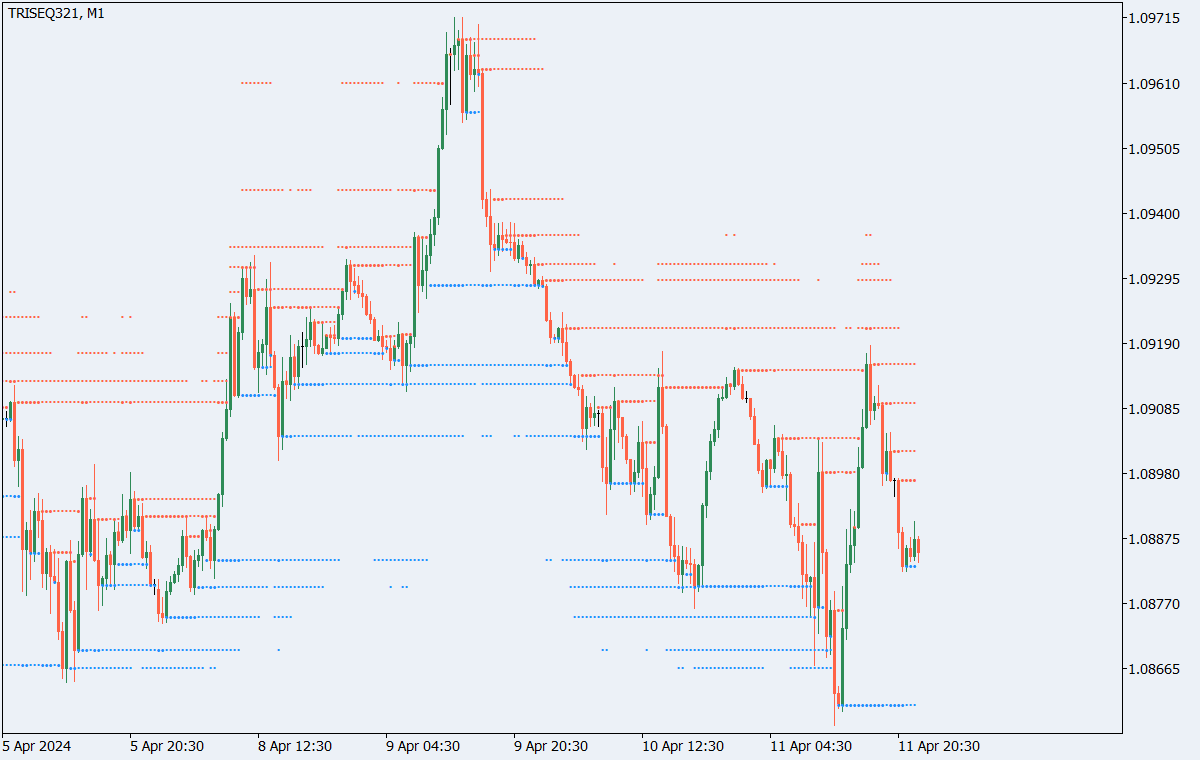
Examples with changed settings are in the manual.
Main settings
| Input | Default |
|---|---|
| Max Age (bars, 1 to 100000) | 600 |
| Max Distance (percent of the close, 0.1 to 100) | 3 |
| Merge Distance (points, 0 to 100000) | 15 |
| Closed Bars Only | true |
| Show Trilogy brand and QR code | true |
| Brand position (chart corner) | Lower left |
| Brand horizontal offset (pixels) | 10 |
| Brand vertical offset (pixels) | 10 |
Usage specifications
Confirmed values with the same history and settings
Dots output on closed bars are not later moved to the center of peaks or troughs. Recalculating from the beginning after adding to or correcting the history, changing settings or reloading may change results.
Price digits and point
A point is the price increment the terminal defines for that symbol. If point=0.00001, 15 points=0.00015; if point=0.01, it is 0.15. There is no automatic conversion to pips or linkage to spread.
Dots and colors
Resistance is Tomato and support is DodgerBlue. Rank 1 is width 2 and the rest are width 1, with symbol 158. If it is hard to judge by color alone, also check whether the level is above or below the price and the level labels.
Functions not included
There are no notifications, automatic orders, selection of another timeframe, lines per placement location, start position determined by the number of screens, global variable settings or account authentication.
For on-screen display only
The display is a record of calculation results. It does not direct trading decisions and does not guarantee future price movements.
Full manual
How to read the display, the settings, installation and what to check when something goes wrong, on one page. The product is in preparation for release; the manual is published so that you can review its content.
- MT5 display and examples of changed settings
- How to read it in 30 seconds
- What it measures
- Situations for reading the display
- Steps for checking the display
- Installation and checking the package contents
- Settings
- Usage specifications
- Troubleshooting and usage notes
- Technical information and specification details