Alligator Swing ZigZag
Checks whether a whole candle is above or below the three averages. When a bar goes to the side opposite the last outside bar, it confirms the top or bottom of the segment and puts a mark at the extreme price on that bar.
Coming soon · MT5 only · no licence file needed
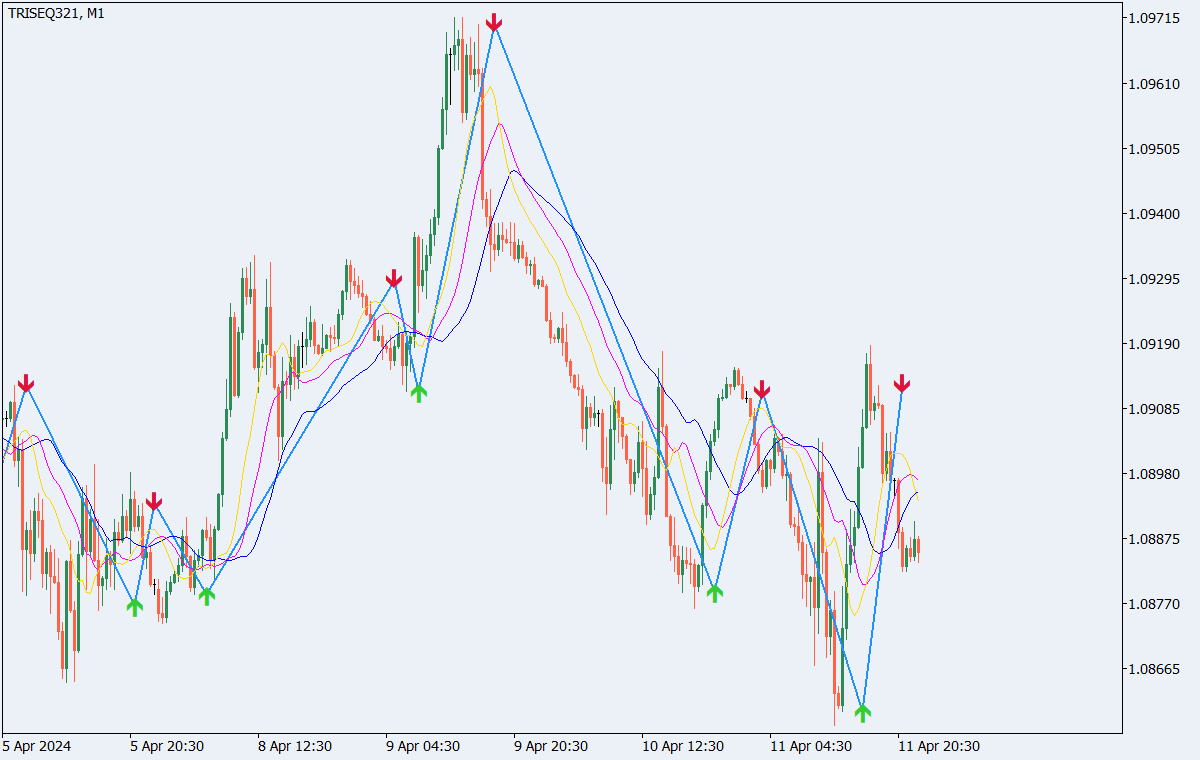
Examples with changed settings are in the manual.
Main settings
| Input | Default |
|---|---|
| Jaw Period (1 to 500) | 13 |
| Jaw Shift (0 to 100) | 8 |
| Teeth Period (1 to 500) | 8 |
| Teeth Shift (0 to 100) | 5 |
| Lips Period (1 to 500) | 5 |
| Lips Shift (0 to 100) | 3 |
| MA Method | SMMA |
| Applied Price | Median |
| Closed Bars Only | true |
| Show Trilogy brand and QR code | true |
| Brand position (chart corner) | Lower left |
| Brand horizontal offset (pixels) | 10 |
| Brand vertical offset (pixels) | 10 |
Usage specifications
Confirmed dots
When bars are added with the same history and settings, dots on closed bars are not moved to past extreme bars. Settings changes, adding older history or corrections may change recalculated results.
Handling of the latest bar
Even with true, the lines are drawn up to the latest bar. If Shift is positive, past averages are referenced; if 0, the average of the forming bar updates. Dots with false are displays before confirmation.
Right end of the lines
The average lines stop at the latest bar. They are not extended into the future side of the chart by the Shift amount.
Blue segments
A point is connected to the previous one only after the next confirmation point forms. The diagonal line of the completed picture as a whole was not visible from intermediate times.
Functions not included
There is no upper limit that cuts off at 50 dots, no constant extension to forming extreme candidates, and no notifications, orders, account authentication or license file.
For on-screen display only
The display is a record of calculation results. It does not direct trading decisions and does not guarantee future price movements.
Full manual
How to read the display, the settings, installation and what to check when something goes wrong, on one page. The product is in preparation for release; the manual is published so that you can review its content.
- MT5 display and examples of changed settings
- How to read it in 30 seconds
- What it measures
- Situations for reading the display
- Steps for checking the display
- Installation and checking the package contents
- Settings
- Usage specifications
- Troubleshooting and usage notes
- Technical information and specification details